
搜索到
88
篇与
Jammm
的结果
-
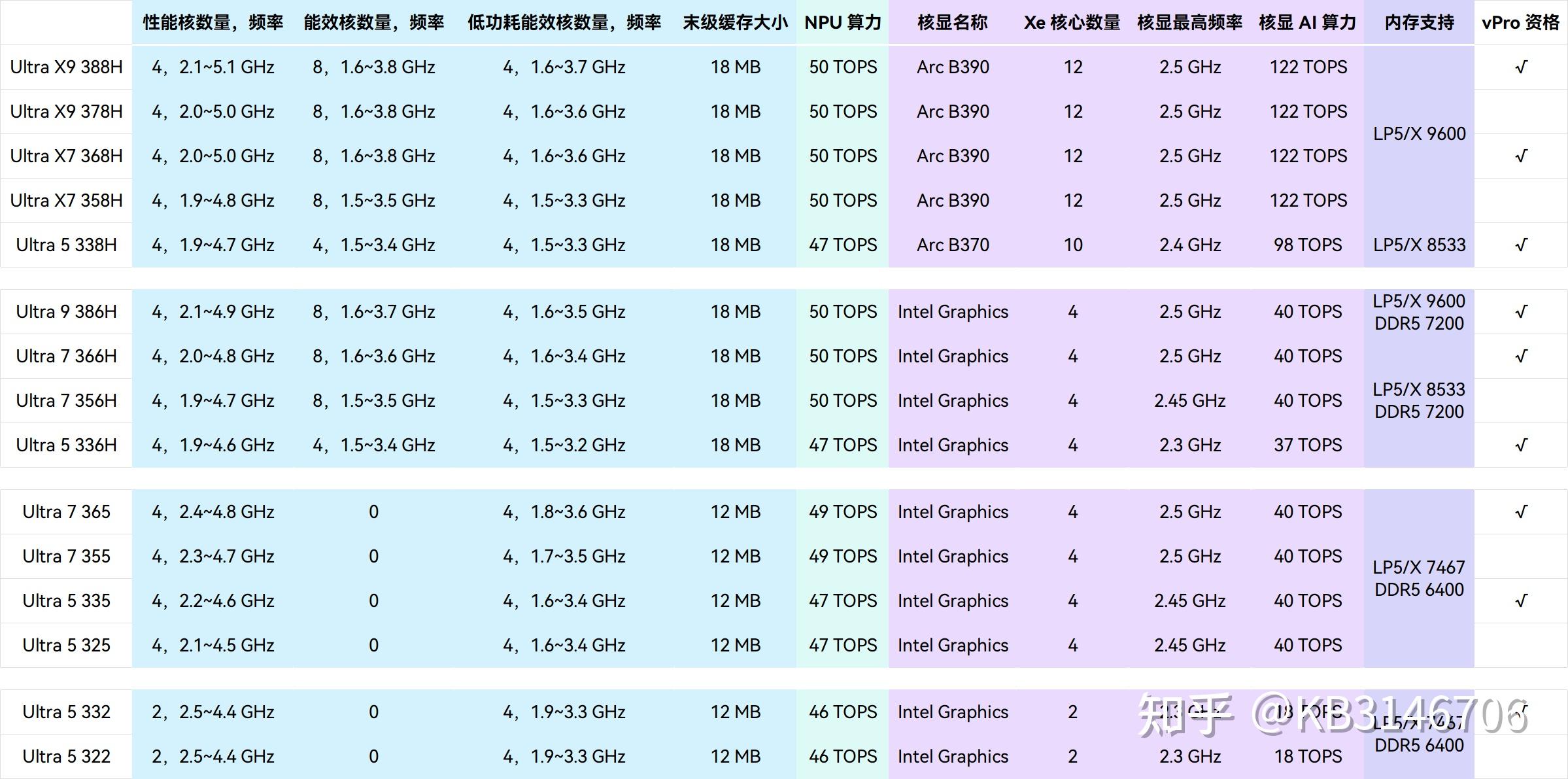
 26年下半年电脑购买建议 先说一个大前提:28年左右性能会大翻,因为那时候N卡60系列会发布,AMD Intel的新架构 GAA 2nm工艺节点价格才会降一点轻薄本 轻薄本品类,如果就是office三件套且 离电需求长,建议看看macbook(neo除外) 。Win本这边长续航+离电性能就是今年发布的Pather Lake的轻薄本了 如:Ultra 5 338H Ultra X7 358H详细看下面 有游戏需求直接选择Arc B390核显的U 但这些本子目前都是万元户 如果是刚需看看机械革命的星耀14 无界15X 无界14X Pro星耀14 AI 9 H365 32+1T国补后4600不到还是很值得入手的轻薄本需要就可以入手 游戏本游戏本这边如果手上有能满足目前基础游戏需求的本子或者台式,就暂时不考虑买,硬熬到28年看60显卡发布后再考虑是否更换目前鸡哥5060游戏本16+1T国补后都在7500左右 不是很划算 16G的内存目前来说不是很够用了 肯定要自己加内存了 现在16G一条估计1300,整体价格还是要到9K-1W。所以非刚需还是不要购买。台式机直接Pass
 -
主站更换Halo系统! 用了这么久的Typecho,登录设置各方面性能都跟不上了,之前halo就试着搭建过也用了这么久,是时候迁移了。目前jampang.cn halo.jampang.cn均已指向本站typecho老站更换域名:https://blog.jampang.cn为什么迁移?typecho使用的php加上插件只能使用7.4版本,对于大主题和较多插件来说,已经反应变慢。我自己体会就是点击登录后,需要等待3秒左右的时间才能转跳进后台。在修改插件配置或者主题的部分设置时,点击外观也需要等待3秒左右才能加载出页面,点击保存也是。typecho更新太久太久,确实安全性?(先打问号推荐迁移吗?看服务器,halo是基于Java执行性能是比php快。但Java的后端意味着使用的SpringBoot框架,内置Tomcat,所以运行内存会占用400M以上。然后就是云服务器还是虚拟空间(或者叫虚拟主机:只有目录权限,用FTP上传文件,这种只能支持php)。Java部署也不一定就要服务器,可以考虑Serverless(我没怎么了解,可以直接了解一下)ps:我服务器16核心16G的内存,所以我服务器性能是够的。那么便宜好用的服务器去哪买呢当然是轻迅云啦!点我转跳轻迅云
-
Spring Boot3整合MyBatisPlus实现多数据源 1.导入多数据源pom依赖<!-- 多数据源 --> <!-- https://mvnrepository.com/artifact/com.baomidou/dynamic-datasource-spring-boot3-starter --> <dependency> <groupId>com.baomidou</groupId> <artifactId>dynamic-datasource-spring-boot3-starter</artifactId> <version>4.3.1</version> </dependency>2.配置数据库链接spring: datasource: dynamic: #主要数据库 primary: master #严格匹配模式,默认false. true未匹配到指定数据源时抛异常,false使用默认数据源 strict: false datasource: master: driver-class-name: com.mysql.cj.jdbc.Driver url: jdbc:mysql://localhost:3306/database_1?serverTimezone=Asia/Shanghai&useUnicode=true&characterEncoding=utf8 username: database_1 password: database_1 type: com.zaxxer.hikari.HikariDataSource account: driver-class-name: com.mysql.cj.jdbc.Driver url: jdbc:mysql://localhost:3306/database_2?serverTimezone=Asia/Shanghai&useUnicode=true&characterEncoding=UTF-8 username: database_2 password: database_2 type: com.zaxxer.hikari.HikariDataSource charac: driver-class-name: com.mysql.cj.jdbc.Driver url: jdbc:mysql://localhost:3306/database_3?serverTimezone=Asia/Shanghai&useUnicode=true&characterEncoding=UTF-8 username: database_3 password: database_3 type: com.zaxxer.hikari.HikariDataSource postal: driver-class-name: com.mysql.cj.jdbc.Driver url: jdbc:mysql://localhost:3306/database_4?serverTimezone=Asia/Shanghai&useUnicode=true&characterEncoding=utf8 username: database_4 password: database_4 type: com.zaxxer.hikari.HikariDataSource 3.在Mapper上标注@DS比如我这个mapper是Account数据库import com.baomidou.dynamic.datasource.annotation.DS; import com.baomidou.mybatisplus.core.mapper.BaseMapper; import com.jam.entities.gameEntities.Accounts; import org.springframework.stereotype.Repository; @DS("account") @Repository public interface AccountsMapper extends BaseMapper<Accounts> { }4.在启动器标注扫描Mapper@MapperScan("com.jam.mapper.**")@SpringBootApplication @EnableCaching @MapperScan("com.jam.mapper.**") public class DemoApplication { public static void main(String[] args) { SpringApplication.run(DemoApplication.class, args); } }
-
SpringBoot在使用@Cacheable缓存对象为空 1.情况SpringBoot在使用@Cacheable缓存对象为空具体就是在实体类的时候,List<Integer>为空1.1 实体类@Schema( description = "赠送礼物id") private List<Integer> itemId; @Schema( description = "赠送礼物数量") private List<Integer> itemNum;1.2 数据库item_id varchar(255)item_num varchar(255)1.3 Service@Cacheable(cacheNames = "Task", sync = true, key = "#root.methodName+ '_'+ #root.args[1] + #page + '_' + #size")1.4 具体情况在mybatisplus的日志中Row: 5, 1333, 333, [3037], [1], 1, 2025-11-05 16:10:45, null, 2025-11-05 16:10:45, 0也就是在mybatisplus读取数据的时候是正常的,但是List<Task> taskList = iPage.getRecords(); for (Task task1 : taskList) { System.out.println(task1); System.out.println(task1.getItemId() + "---" + task1.getItemNum()); }在输出taskList的时候Task(id=9, name=555, content=555, itemId=null, itemNum=null, onlineCount=1, createTime=Wed Nov 05 16:54:30 CST 2025, endTime=Thu Nov 06 00:00:00 CST 2025, updateTime=Wed Nov 05 16:54:30 CST 2025, deleted=0)null---null可以看到itemId itemNum均为nullredisTemplate配置了FastJsonRedisSerializer就是在转为 List<Integer>的时候出了问题2.解决方案我的Fastjson22.1 maven导入Fastjson2 <!-- fastJson --> <!-- https://mvnrepository.com/artifact/com.alibaba.fastjson2/fastjson2 --> <dependency> <groupId>com.alibaba.fastjson2</groupId> <artifactId>fastjson2</artifactId> <version>2.0.59</version> </dependency>2.2 附上我的RedisConfig.javaimport com.fasterxml.jackson.databind.ObjectMapper; import org.springframework.cache.annotation.EnableCaching; import org.springframework.context.annotation.Bean; import org.springframework.context.annotation.Configuration; import org.springframework.data.redis.cache.RedisCacheConfiguration; import org.springframework.data.redis.cache.RedisCacheManager; import org.springframework.data.redis.connection.RedisConnectionFactory; import org.springframework.data.redis.core.RedisTemplate; import org.springframework.data.redis.serializer.GenericJackson2JsonRedisSerializer; import org.springframework.data.redis.serializer.RedisSerializationContext; import org.springframework.data.redis.serializer.StringRedisSerializer; import java.time.Duration; import java.util.HashMap; import java.util.Map; @Configuration //@EnableCaching开启对SpringCache的支持(提供基于方法级别的缓存) @EnableCaching public class RedisConfig { /** * 默认缓存到期时间 */ private static final Integer DEFAULT_EXPIRE_TIME = 3600; @Bean @SuppressWarnings("all") public RedisTemplate<String, Object> redisTemplate(RedisConnectionFactory redisConnectionFactory, ObjectMapper objectMapper) { //便于开发自己编写redis RedisTemplate<String, Object> template = new RedisTemplate<>(); template.setConnectionFactory(redisConnectionFactory); //序列化配置 GenericJackson2JsonRedisSerializer serializer = new GenericJackson2JsonRedisSerializer(); // FastJsonRedisSerializer<Object> serializer = new FastJsonRedisSerializer<>(Object.class); // FastJson2JsonRedisSerializer<Object> serializer = new FastJson2JsonRedisSerializer<>(Object.class); //string序列化 StringRedisSerializer stringRedisSerializer = new StringRedisSerializer(); //key 采用string的序列化 template.setKeySerializer(stringRedisSerializer); template.setValueSerializer(serializer); //hansh的key也采用string的序列化方式 template.setHashKeySerializer(stringRedisSerializer); //hansh的value也采用string的序列化方式 template.setHashValueSerializer(serializer); //设置默认 template.setDefaultSerializer(serializer); template.afterPropertiesSet(); return template; } /** * 配置SpringCache基于方法级别的缓存的过期时间、key-value的序列化方式 * * @param connectionFactory * @return */ @Bean public RedisCacheManager cacheManager(RedisConnectionFactory connectionFactory) { //设置特有的Redis配置 Map<String, RedisCacheConfiguration> speCacheConfigurations = new HashMap<>(); //定制化的Cache为300s\400s\500s speCacheConfigurations.put("cacheName1",redisCacheConfiguration(300)); speCacheConfigurations.put("cacheName2",redisCacheConfiguration(400)); speCacheConfigurations.put("cacheName3",redisCacheConfiguration(500)); //根据redis缓存配置和redis连接工厂生成redis缓存管理器 RedisCacheManager redisCacheManager = RedisCacheManager.builder(connectionFactory) .cacheDefaults(redisCacheConfiguration(DEFAULT_EXPIRE_TIME)) // 默认缓存配置 .withInitialCacheConfigurations(speCacheConfigurations) // 定制化的缓存配置 .build(); return redisCacheManager; } /** * RedisCacheConfiguration redis缓存配置 * * @param ttl 缓存过期时间 * @return */ public RedisCacheConfiguration redisCacheConfiguration(Integer ttl) { //redis缓存配置 RedisCacheConfiguration config = RedisCacheConfiguration.defaultCacheConfig() //缓存生存时间60秒 .entryTtl(Duration.ofSeconds(ttl)) // 配置Key序列化(解决乱码的问题) .serializeKeysWith(RedisSerializationContext.SerializationPair.fromSerializer(new StringRedisSerializer())) // 配置Value序列化 .serializeValuesWith(RedisSerializationContext.SerializationPair .fromSerializer( new GenericJackson2JsonRedisSerializer() // new FastJsonRedisSerializer<Object>(Object.class) )) // 不缓存空值 .disableCachingNullValues(); return config; } }2.3 创建JsonListIntegerTypeHandler.javaimport com.alibaba.fastjson2.JSON; import com.alibaba.fastjson2.TypeReference; import org.apache.ibatis.type.BaseTypeHandler; import org.apache.ibatis.type.JdbcType; import java.sql.CallableStatement; import java.sql.PreparedStatement; import java.sql.ResultSet; import java.sql.SQLException; import java.util.List; public class JsonListIntegerTypeHandler extends BaseTypeHandler<List<Integer>> { // 插入/更新时:将List<Integer>转为JSON字符串存入数据库 @Override public void setNonNullParameter(PreparedStatement ps, int i, List<Integer> parameter, JdbcType jdbcType) throws SQLException { String jsonStr = JSON.toJSONString(parameter); // 例如:[3037, 3038] ps.setString(i, jsonStr); } // 查询时:从数据库读取字符串并解析为List<Integer> @Override public List<Integer> getNullableResult(ResultSet rs, String columnName) throws SQLException { String jsonStr = rs.getString(columnName); return parseJsonToList(jsonStr); } @Override public List<Integer> getNullableResult(ResultSet rs, int columnIndex) throws SQLException { String jsonStr = rs.getString(columnIndex); return parseJsonToList(jsonStr); } @Override public List<Integer> getNullableResult(CallableStatement cs, int columnIndex) throws SQLException { String jsonStr = cs.getString(columnIndex); return parseJsonToList(jsonStr); } // 解析JSON字符串为List<Integer> private List<Integer> parseJsonToList(String jsonStr) { if (jsonStr == null || jsonStr.trim().isEmpty()) { return null; } // 使用FastJSON解析为List<Integer> return JSON.parseObject(jsonStr, new TypeReference<List<Integer>>() {}); } }2.4 在实体类上注解@TableField @Schema( description = "赠送礼物id") @TableField(value = "item_id", typeHandler = JsonListIntegerTypeHandler.class) private List<Integer> itemId; @Schema( description = "赠送礼物数量") @TableField(value = "item_Num", typeHandler = JsonListIntegerTypeHandler.class) private List<Integer> itemNum;2.5 最重要的在properties或者yaml中启动Handler下面的xxx换成你自己包的目录2.5.1 yamlmybatis-plus: typehandlers-package: com.xxx.handler2.5.2 propertiesmybaits-plus.typehandlers-package=com.xxx.handler3 结果展示Task(id=9, name=555, content=555, itemId=[3037], itemNum=[1], onlineCount=1, createTime=Wed Nov 05 16:54:30 CST 2025, endTime=Thu Nov 06 00:00:00 CST 2025, updateTime=Wed Nov 05 16:54:30 CST 2025, deleted=0)[3037]---[1]
-
【2025年11月】AMD,9600X主机,5060/5060ti显卡,7k电脑推荐 以下仅代表个人认为性格比+质量在一个比较平衡范围内的配置。价格都是淘宝或者天猫店铺的,可以去pdd上瞅一瞅,价格会更低。对于其他价格区间,根据自己的需求在硬盘、显卡、CPU、内存大小上省。不推荐在电源上省钱,固态硬盘尽量买有质保,机械硬盘不推荐二手。本文章内涉及的价格为淘宝/天猫价格,仅供参考。本文章内涉及的链接均为参考,无任何广告行为。机箱根据自己预算和喜好自行选择。{dotted startColor="#ff6c6c" endColor="#1989fa"/}长期保存重要资料建议加一个机械硬盘重要资料一定要多份备份 + 云盘去pdd看看 应该能控制在7K主板CPU 我选择的这家店没有B650M AYW WIFI,可以去pdd看 2000出头固态换成佰维nv7400(GM7代工厂家) pdd 579散热pdd便宜20 电源也便宜就可以控制在7K以内电脑配件 名称产品价格渠道购买地址CPU+主板R5 9600X散片+华硕 B850M AYW GAMING WIFI2189淘宝店铺地址散热器利民AX120SE 白色 ARGB91天猫店铺地址内存条金百达银爵 6000Mhz 海力士M C30 16x2 共32G1429天猫店铺地址机箱S960全视白+棱镜5pro白色ARGB风扇*9,,,4正5反271.5天猫店铺地址电源利民TR-TG750S-W金牌【直出白扁线/ATX3.0+PCIE5.0】350.89天猫店铺地址固态硬盘致钛tiplus7100 pcie4*4 7000MB/S699天猫店铺地址显卡1MS-RTX5060 iCraft OC8G AIGAX22349 店铺地址显卡2MS-RTX5060Ti iCraft OC16G3449 店铺地址总金额1 7379.39 总金额2 8479.39